KNDL: The Knowledge Layer Your AI Agent Has Been Missing
KNDL (Knowledge Node Description Language) is a typed graph language for AI agents — structured facts with confidence scores, decay, and provenance. Learn the core idea and get started in five minutes.
KNDL: The Knowledge Layer Your AI Agent Has Been Missing
If you've just joined the project (or you're curious what KNDL actually is) this post is for you. No prior background required. By the end you'll understand the core idea, why it exists, and how to start using it today.
The Problem It Solves
Imagine you're building using an AI agent. At some point, that agent needs to know things: for example, who a person is, what a sensor is currently reading, which events are related to which systems. The naive approach is to dump all this into a flat JSON blob or a plain text prompt. It works — until it doesn't.
The trouble is that real knowledge is messy:
- Some facts are more reliable than others
- Some facts go stale over time
- Facts connect to each other in meaningful ways
- You need to know where a piece of information came from
KNDL (Knowledge Node Description Language) is a small declarative language that solves exactly this. It lets you represent structured knowledge as a typed graph,
Each fact is a node with typed fields. Relationships between facts are edges. Every piece of data carries a confidence score and can expire or decay over time, so your AI agent always knows how much to trust what it knows.
The Core Idea in One Minute
KNDL has three building blocks: nodes, edges, and intents.
Nodes are entities — a person, a sensor, a building, an event. Each node has a type, some fields, and optional metadata about how much to trust it and where it came from:
node @sensor_01 :: Temperature {
  value     = 22.5
  unit      = "°C"
  location  -> @building_7
  ~confidence 0.94
  ~source     "sensor://bldg-7/t-001"
  ~valid      2026-04-10T14:00Z .. *
  ~decay      0.95 / 1h
}
A few things to notice:
@sensor_01is the node's ID — always prefixed with@.:: Temperatureis its type.location -> @building_7is an inline reference to another node.- Lines starting with
~are metadata: confidence, source, validity window, and how fast the confidence decays over time.
Edges make relationships explicit and first-class:
edge @sensor_01 -[LocatedIn]-> @building_7 {
  ~confidence 1.0
}
Intents let you attach declarative actions to the graph — useful when you want an agent to react to conditions:
intent @overheat :: Action {
  trigger = @sensor_01.value > 30.0
  do { emit :: HeatAlert { level = "critical" } }
  ~priority 0.95
  ~cooldown  15m
}
That's the whole language in a nutshell. Nodes hold facts, edges relate them, and intents specify what to do when conditions are met.
Why Confidence and Decay Matter
This is where KNDL gets interesting. Most knowledge stores treat all data as equally valid. KNDL doesn't.
A ~confidence 0.94 annotation means: "I'm 94% sure this is correct." A ~decay 0.95 / 1h means: "my confidence in this drops to 95% of what it was every hour." So a sensor reading that was highly reliable at noon becomes increasingly suspect by evening — automatically.
When your agent queries the graph, it can filter by minimum confidence:
people = graph.query_nodes(type_name="Person", min_confidence=0.9)This lets you build agents that reason carefully about uncertainty, without writing that logic by hand every time.
Getting Started in Five Minutes
1. Install the Python library
KNDL requires Python 3.12+. From the repo root:
cd packages/python
uv sync
2. Write your first graph
import kndl

graph = kndl.compile("""
node @alice :: Person {
  name = "Alice"
  age  = 30
  ~confidence 0.99
  ~source     "agent://hr"
}

node @bob :: Person {
  name = "Bob"
  age  = 28
  ~confidence 0.85
  ~source     "agent://survey"
}

edge @alice -[Knows]-> @bob {
  ~confidence 0.7
}
""")

# Query all high-confidence people
people = graph.query_nodes(type_name="Person", min_confidence=0.9)
print(people)  # Returns only Alice

# Serialize back to KNDL text
print(kndl.serialize(graph))
3. Persist to storage (optional)
By default the graph lives in memory. To persist it, set a DATABASE_URL before running:
# SQLite (simplest — no extra dependencies)
export DATABASE_URL=sqlite:///./kndl.db

# PostgreSQL (if you need scale)
export DATABASE_URL=postgresql://user:password@localhost:5432/kndl
pip install 'kndl[postgres]'
Then in code:
from kndl.storage import create_storage
from kndl.graph import KNDLGraph

storage = create_storage()
graph = KNDLGraph.from_storage(storage) if storage else KNDLGraph()
Using KNDL with Claude (via MCP)
KNDL ships a Model Context Protocol (MCP) server that exposes 13 tools directly to Claude Desktop. Once configured, Claude can read, write, and query a live KNDL graph as part of any conversation.
Start the server
cd packages/mcp-server
uv run python -m kndl_mcp           # stdio mode (for Claude Desktop)
uv run python -m kndl_mcp --http    # HTTP mode on port 8000
Add it to Claude Desktop
In your claude_desktop_config.json, add an entry pointing to the running server. After that, Claude has live access to your knowledge graph — it can add nodes, query them, and reason over the structure as part of a normal conversation.
Exploring the Graph Visually
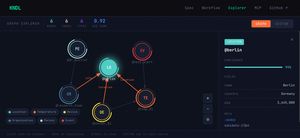
The project includes an interactive web explorer built with React and Vite. Fire it up from the website/ directory and navigate to /explorer. You'll get:
- A force-directed graph layout
- Node inspection on click
- Live KNDL editing
- Confidence rings visualized around each node
It's the fastest way to build intuition for how nodes and edges relate before writing any code.
The Mental Model to Keep
KNDL is not a database. It's not a vector store. It's a structured belief layer — a place to put things your agent knows, how confident it is, and where those beliefs came from. It sits naturally between raw data sources and the reasoning layer of an agent.
When in doubt, ask: "Is this a fact that an agent should know, track over time, and reason about?" If yes, it probably belongs in KNDL.
Where to Go Next
- GitHub: github.com/artdaw/KNDL — source code, spec, and formal EBNF grammar in
spec/ - Tests as examples:
packages/python/has 141 unit tests that double as a great reference for real usage patterns - MCP tools reference: the server exposes 2 resources and 2 prompts in addition to the 13 tools — worth reading if you're integrating with Claude
Welcome to the project. If something in this post is unclear or out of date, open an issue or send a PR — the docs live alongside the code.